Not just lower.
Truly lowered.
ETS2 already lets you lower the suspension, but only a few centimetres within the factory travel — the truck keeps its stock ride height. This is something else.
Lowering the suspension
- Only moves within the factory travel: a few centimetres down and that's it.
- The truck keeps its stock ride height.
- No memories, no auto mode, no diagnostics.
Truly lowered
- Lowride changes the base ride height of every truck — all the way to the ground, at any speed.
- AirCtrl raises and lowers from there, axle by axle, with the real height read from the game.
- Memories, AUTO, calibration, diagnostics and air leaks — in a 3D in-game remote.
Real air suspension.
Without leaving the cab.
This isn't a normal plugin. Instead of only using the factory travel, it works with the truck's real suspension and — with Lowride included — starts from an already lowered height. Raise, lower, save heights and detect leaks, just like a real truck.
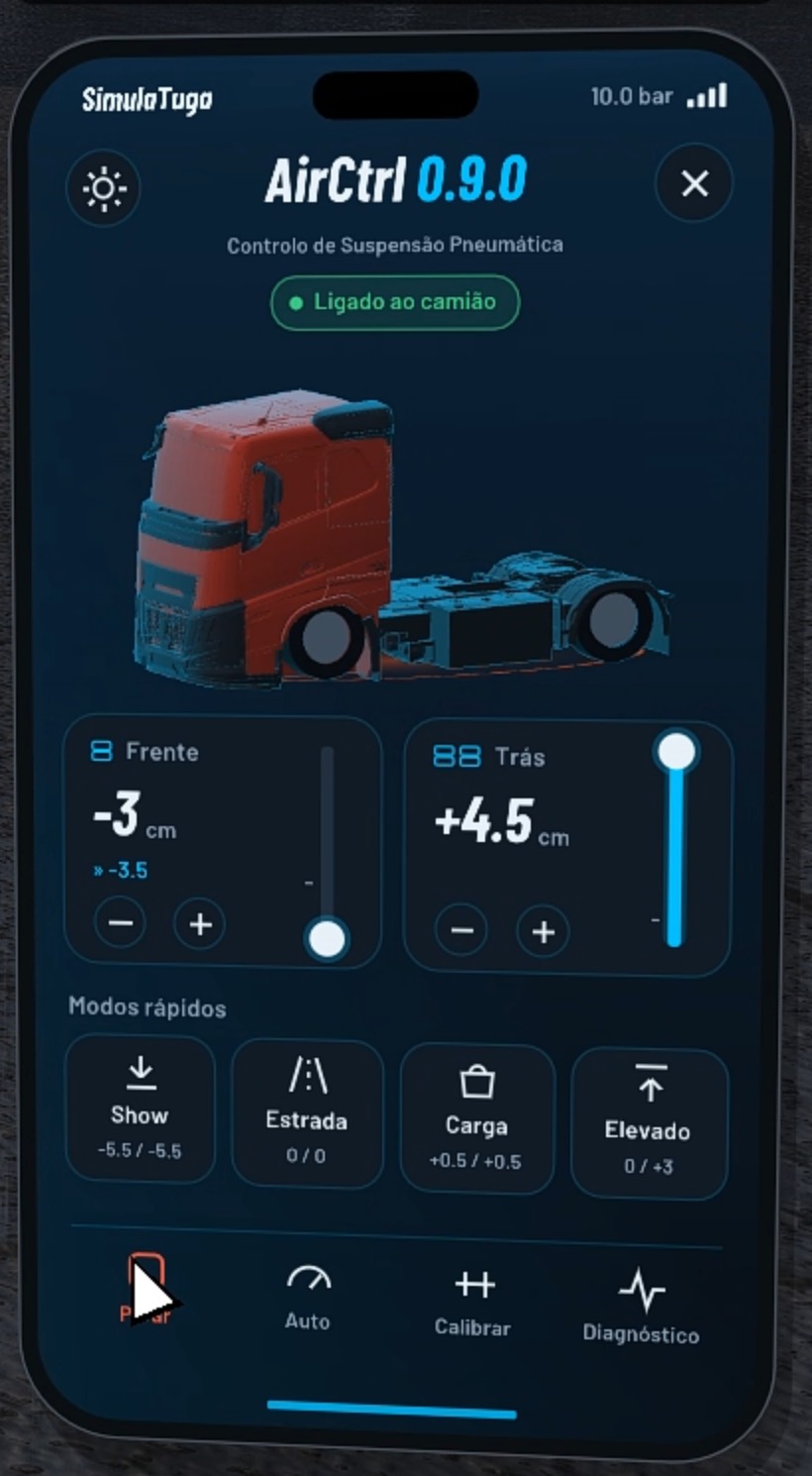
Axle by axle, with the real height
Front and rear are independent. The bars show each axle's real position, read from the game. Mouse wheel: 5 mm per step.
Quick modes
One tap and the truck settles. Plus memories M1, M2 and M3 (hold 1 s to save the current height).
AUTO
From 15 km/h it goes to road height by itself; stopped with the handbrake on, it goes back to the height it was at.
Quick controls
INSERT shows the remote; Mouse wheel or HOME / DELETE raise and lower. Every key can be changed in config.ini — even mouse buttons and key combos.
Exact travel for every truck
One tap on CALIBRATE: all the way down, all the way up and back to level (~20 s). LEVEL resets zero after hitching or dropping a trailer.
Everything in view
Height of each wheel, side-to-side difference, circuit pressure, compressor, measured travel and chassis damage. Filled dot = game value; hollow = simulated.
Simulated, like real life
They appear with use and chassis damage. With the engine off the axle sinks by itself — you may wake up with the truck on the ground. TEST LEAKS (30 s) tells you which axle is losing air; the workshop fixes it.
Control it from outside the game
Open 127.0.0.1:37520 on your PC or, with lan=1, on your phone on the same Wi-Fi. With compressor and air sounds.
Phone, edge or pill
Three looks for the remote — in 3D, tilted like an object in your hand, or flat and facing you.
Português, English, Français
Picks the game's language automatically. A short help appears the first time you open the remote.
AirCtrl is in beta
Everything works — raising, lowering, memories, AUTO, calibration, diagnostics and leaks. What's still being polished is the 3D truck inside the remote: on some trucks it may not show up 100% assembled yet (parts out of place or missing). It doesn't affect the suspension. The fixes come in upcoming updates, also free.
Every truck.
Lowered in one go.
A program (.exe) that builds a mod with every base-game and DLC truck lowered from stock, at any speed. AirCtrl keeps raising and lowering from there.
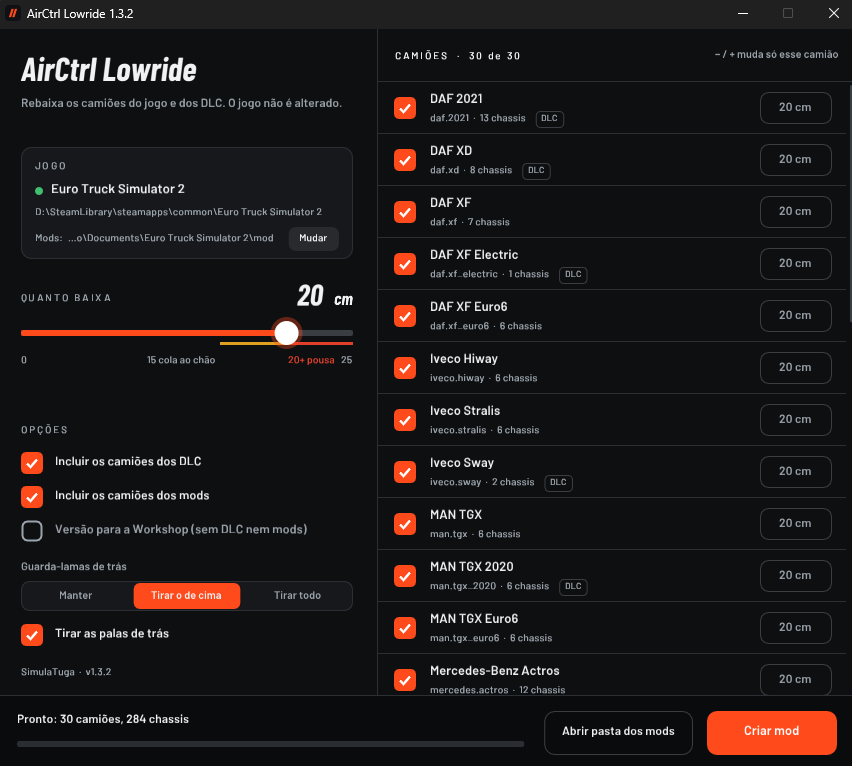
How it works
- Close the game and open
AirCtrlLowride.exe— it finds the game by itself. - Pick how low on the slider (15 cm hugs the ground, max 25) — for all trucks, or one by one with − / +.
- Click Create mod. You get
airctrl_lowride.scs. - In the Mod Manager, enable AirCtrl Lowride and put it at the top.
Trucks included
30 trucks and 284 chassis, from 4x2 to 8x4. Toggle DLC and modded trucks, remove mudguards (top only or all) and rear mud flaps, and there's a Workshop version with no DLC or mods. It only reads the game files — never changes them — and never goes online.
Good to know
- About 15 cm puts a normal truck on the ground. Over 20 cm the truck sits on its body and won't move (max 25).
- Run the program again after every game update.
- Works in Convoy as an optional mod. Doesn't work on TruckersMP.
- The regular mod is for personal use. To share on the Workshop, use the "Workshop version" option (no DLC or mods).
The mods.
Everything is free — no account, no sign-up, no payments. If you like the work, you can support it on Buy Me a Coffee.
All of this is free, but it isn't free to make. It's hours of coding and testing truck by truck, plus tools and hosting. If the mods are useful to you and you can help with a coffee, I'd really appreciate it — it helps keep the updates coming.
☕ SupportWhat truckers
are saying.
Tried AirCtrl or Lowride? Leave a review — good or bad, it helps improve the mods. Reviews show up once approved.
Leave a review
Message me on Instagram or comment on the YouTube video — reviews show up here once approved.
Instagram @simulatuga_pt Comment on YouTubeFour steps.
Lowride needs no install: just open the .exe and follow the steps above.
Download
Click Download AirCtrl — the zip downloads right away, no sign-up.
Copy
Close the game and copy the plugins folder from the zip into bin\win_x64 (Steam → Manage → Browse local files).
Accept
When the game starts, a notice about SDK features appears: click OK.
Drive
Turn the ignition on and press INSERT. A short help appears the first time.
Questions.
The remote doesn't show up in the game
Make sure the game runs on DirectX 11 (Options → Graphics → Renderer) and that the file is at bin\win_x64\plugins\airctrl.dll — win_x64, not win_x86. With the game running, open http://127.0.0.1:37520 in your browser: if the page opens, the plugin is working. On a laptop you may need Fn + Insert. Overlays like MSI Afterburner or RivaTuner can interfere.
Windows or my antivirus showed a warning
That's normal: the plugin draws over the game and the files don't have a paid digital signature. Choose "More info → Run anyway", or restore it from quarantine and add an exception for the folder. You can double-check on VirusTotal. Only download from this page.
The suspension doesn't move
The truck needs air suspension and the ignition on. If it still doesn't move, set generic_device=1 in config.ini, restart and bind the suspension actions to the "AirCtrl suspension remote" device in Options → Keys & buttons.
Does it work with other mods (TM Walk, etc.)?
Yes. AirCtrl and Lowride work with popular mods such as TM Walk (walking outside the truck), maps, graphics, sounds and modded trucks. AirCtrl is a plugin, so it doesn't clash with the mods in the Mod Manager. With Lowride, just put it above your truck mods in the Mod Manager. If you use ReShade or another overlay, see the next question about keys.
I use ReShade (or another overlay) and the keys don't respond
ReShade and other programs that draw over the game also use keys like INSERT e HOME — the same as AirCtrl. When you press them, the other program grabs the key and the remote doesn't open (or ReShade's menu opens instead of raising the suspension). Fix it one of two ways: change AirCtrl's key in bin\win_x64\plugins\airctrl\config.ini (e.g. key_show=F9, key_raise=PGUP, key_lower=PGDN, or even a mouse button like key_show=MOUSE4), or change the menu key in ReShade's settings. Restart the game afterwards.
The 3D truck in the remote looks badly assembled
That's expected for now: AirCtrl is in beta and the 3D model in the remote isn't perfect on every truck yet. It's only visual — the suspension works the same. It's being fixed in upcoming versions, also free.
Do I need developer mode?
No. The game loads the plugin by itself — you don't need g_developer or the console.
Does it work in multiplayer?
Lowride works in Convoy as an optional mod: you see your truck lowered and players without the mod see it stock. It doesn't work on TruckersMP.
Still not working
Send me the file Documents\Euro Truck Simulator 2\game.log.txt — the lines with [AirCtrl] say what's wrong. Message me on Instagram @simulatuga_pt.
Share the link.
Not the file.
AirCtrl and AirCtrl Lowride are made by SimulaTuga and protected by copyright. The only official download is here.
You may
- Use the mods on your own computer.
- Make videos, streams and screenshots — crediting SimulaTuga with the official link.
- Share the link simulatugamods.pages.dev with anyone.
- Lowride: publish the "Workshop version" on the Workshop, with the credit "AirCtrl Lowride by SimulaTuga" and the official link.
You may not
- Put the files on other sites, Discord, Drive or Mega (re-upload).
- Sell the mods or charge for access.
- Modify, decompile, repack or put them in modpacks without permission.
- Remove the credits or claim to be the author.